
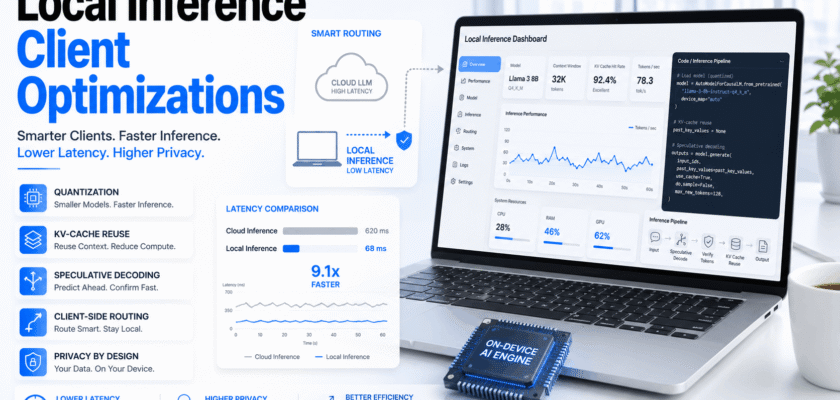
Local Inference Client Optimizations: Why Latency Is Falling
Local inference client optimizations are changing how apps use large language models. Earlier, most AI apps sent every prompt to a remote cloud model. That worked, but it also added network delay, server queues and higher inference cost.
Now, more apps are moving simple or repeated tasks closer to the user. A laptop, phone, workstation, browser extension or edge device can run a smaller model locally. Meanwhile, the cloud can still handle hard reasoning, long context and enterprise-grade generation.
This hybrid pattern matters because users notice delay. If a writing assistant, coding tool or support bot waits too long before the first token, the experience feels slow. Therefore, software teams are improving the client layer, not only the cloud model.
The biggest upgrades include quantized model files, better CPU and GPU offload, automatic prefix caching, KV-cache compression, continuous batching, speculative decoding and smarter routing between local and cloud models.
| KEY TAKEAWAYThe fastest AI product is not always the one with the largest model. Often, it is the product that sends the right task to the right runtime at the right time. |
Local Inference Client Optimizations and the New AI App Stack
The new AI app stack has three layers. First, the client handles private, short and repeated tasks. Next, an edge or local server handles medium workloads. Finally, the cloud handles heavy reasoning, large tools and high-availability workloads.
This design reduces unnecessary round trips. In addition, it lets apps keep sensitive prompts on the device when the use case allows it.
However, local inference is not magic. A client device still has limited memory, battery, thermal headroom and compute. Because of this, optimization is the real difference between a useful local model and a slow demo.
The Seven Upgrades Behind Faster Local LLM Inference
✓ Quantized weights reduce model size and memory pressure.
✓ CPU/GPU offload lets the runtime use available hardware more efficiently.
✓ KV-cache reuse avoids repeated prompt computation in similar sessions.
✓ Speculative decoding drafts tokens quickly and verifies them with a stronger model.
✓ Continuous batching improves throughput when several requests run together.
✓ Prompt routing sends easy tasks local and hard tasks to the cloud.
✓ Streaming responses reduce the perceived wait before users see output.
Why KV Cache Is the Hidden Bottleneck
The KV cache stores attention data that the model needs while generating tokens. As context windows grow, this cache can become a major memory bottleneck.
vLLM documentation describes automatic prefix caching as a way to avoid redundant prompt computation by caching KV-cache blocks. NVIDIA also documents TensorRT-LLM KV-cache optimizations such as paged, quantized and circular-buffer KV cache.
Because memory is limited on local devices, KV-cache design matters. A model that fits at launch can still slow down when a long prompt fills memory.
Quantization: Smaller Models, Faster Starts
Quantization reduces the number of bits used to store model weights or cache values. In simple terms, it makes the model lighter.
For local inference, this can improve startup time and reduce memory use. It can also let a device run a model that would otherwise be too large.
Still, teams must test quality. A very small quantized model may answer faster, but it may also lose accuracy on complex tasks. Therefore, the best setup balances speed, quality and hardware limits.
Speculative Decoding: Faster Token Flow
Speculative decoding uses a smaller or faster draft model to guess upcoming tokens. Then a stronger model checks those tokens. If the guesses are accepted, output arrives faster.
vLLM documentation says speculative decoding can reduce inter-token latency in medium-to-low QPS and memory-bound workloads. TensorRT-LLM also lists speculative decoding among its runtime optimizations.
For client apps, this is powerful. A local draft model can begin quickly, while a larger model verifies or improves output when needed.
Prefix Caching and Repeated Workflows
Many apps reuse the same system prompt, policy text, brand voice rules or project context. Without caching, the model may process the same prefix again and again.
Automatic prefix caching helps reduce that waste. It is especially useful for coding assistants, enterprise copilots, customer-support agents and document tools.
Moreover, caching can improve both latency and cost because the app spends less compute on repeated context.
Client Routing: The Smartest Latency Cut
Client routing decides where a prompt should run. A spelling fix, short rewrite or local search summary may run on-device. A complex legal summary, deep code review or large retrieval task may go to the cloud.
This makes the app feel faster because easy tasks avoid server queues. At the same time, users still get stronger models for serious work.
Good routing also improves privacy. Sensitive short prompts can stay local when the app design supports it.
What Developers Should Optimize First
✓ Measure time to first token, not only total generation time.
✓ Use a smaller local model for low-risk tasks.
✓ Compress or summarize context before sending it to any model.
✓ Cache repeated system prompts and shared project prefixes.
✓ Test quantization levels against real user tasks.
✓ Use streaming output so users see progress quickly.
✓ Route difficult prompts to a stronger cloud model instead of forcing local failure.
Common Mistakes in Local Inference Projects
⚠ Using a model that is too large for the target device.
⚠ Ignoring thermal throttling on laptops and mobile devices.
⚠ Measuring demo speed but not real workload speed.
⚠ Forgetting that long context can overload the KV cache.
⚠ Sending every task to local inference even when cloud reasoning is needed.
⚠ Ignoring privacy, logging and prompt-retention settings.
How This Changes AI Product Design
Local inference changes product design because the app can respond before the cloud finishes. It can autocomplete, summarize, classify, filter and prepare context on the device.
As a result, the cloud becomes a specialist layer instead of the first stop for every request. This can reduce cloud spend and improve user trust.
In addition, local inference gives developers more graceful fallback options. If the network is slow, a smaller local model can still handle basic work.
Organic Search Summary for Readers
Local inference client optimizations help apps cut LLM cloud latency by moving simple work closer to the user. They also reduce repeated computation and improve privacy for suitable tasks.
The most important techniques are quantization, KV-cache reuse, speculative decoding, prefix caching and smart routing.
However, the best AI stack is hybrid. Local models handle speed and privacy. Cloud models handle scale, depth and reliability.
Conclusion
Local inference client optimizations are becoming a major software upgrade for AI apps. They make LLM experiences faster, more private and more cost-aware.
The shift is not about replacing the cloud. Instead, it is about reducing waste. Easy prompts should not always travel across the internet, wait in a queue and return after avoidable delay.
The winning AI products will use local inference, edge routing and cloud models together. That is how large language model apps can feel instant without losing intelligence.
Frequently Asked Questions
Q. What are local inference client optimizations?
They are software upgrades that help an app run LLM tasks on a local device or client layer with less delay.
Q. Does local inference replace cloud AI?
No. It usually works best with a hybrid model where simple tasks run local and difficult tasks use cloud models.
Q. What is KV-cache reuse?
It reuses stored attention data so the model does not process the same prompt prefix again.
Q. Why does quantization help?
Quantization makes model weights or cache values smaller, which can reduce memory use and speed up local inference.
Q. What is the best first metric to track?
Time to first token is often the most important user-facing latency metric.


