
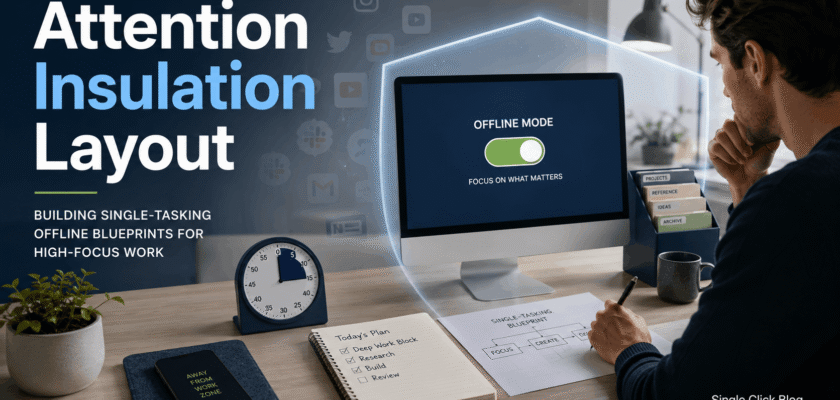
Attention Insulation Layout: Why Focus Needs a Physical System
Attention insulation layout is a simple way to protect focus in a noisy digital day. It means designing a workspace that blocks alerts, reduces visual clutter and keeps one task in front of you.
Many people try to solve distraction with willpower. That rarely works for long. A better plan is to change the environment so the right action becomes easy.
This is why digital public good architects and solo workers are talking about offline operating blueprints. The idea is not to reject technology. Instead, it is to use technology with clear borders.
As a result, the workspace becomes calm. The screen shows less. The desk holds only what is needed. The mind gets fewer chances to jump away.
| KEY TAKEAWAYThe goal is not to own fewer tools. The goal is to make each tool appear only when it is needed. That is how attention gets protected. |
Attention Insulation Layout and Software Attention Fatigue
Software attention fatigue happens when apps keep asking for small decisions. A badge, chat ping or browser tab can pull the mind away from the main task.
APA explains that switching between complex tasks can reduce productivity. It also notes that the cost can be small for one switch, but it can grow when switching repeats all day.
Research on smartphone notifications also shows that mobile alerts can affect cognitive control and attention during demanding tasks. So, the problem is not only weak discipline. The system itself can create pressure.
Why Digital Public Good Architects Care About Offline Blueprints
Digital public goods are open tools, data, AI systems and content built for broad public benefit. The Digital Public Goods Alliance describes them as digital resources that follow laws and best practices.
These systems often serve many users. So, the people who design them must think clearly. They need time for policy, privacy, access, language, safety and long-term maintenance.
Because of this, single-tasking is not a luxury. It can become a design rule. A person who designs public tools needs fewer interruptions, clearer notes and better decision space.
The Four Layers of an Attention Insulation Layout
✓ Physical layer: a clean desk, one notebook and one active device.
✓ Screen layer: one open window and no visual notification badges.
✓ Network layer: offline blocks for writing, planning and review.
✓ Recovery layer: short breaks away from the screen after deep work.
| FOCUS DESIGN BOXIf the work does not need the internet, remove the internet for that block. This one rule can reduce many hidden distractions. |
How to Build a Custom Offline Workspace Setup
Start with one task. Do not redesign the whole life in one day. Choose the task that needs your best attention, such as writing, coding, research or planning.
Next, remove every tool that does not support that task. Close chat. Hide the browser. Put the phone away. Keep only the files, notes and app needed for the work.
Then set a short offline window. A 30-minute block is enough at the start. Over time, the block can grow to 60 or 90 minutes.
Starter Setup Checklist
✓ One main screen only.
✓ One active document or app.
✓ Phone outside arm reach.
✓ Browser closed unless needed.
✓ Notification badges hidden.
✓ Paper note for quick thoughts.
✓ Timer set for one work block.
Minimalist Computer Desktop Layout for 2026
A minimalist desktop should reduce choices. It should not become another design project. The best layout is plain, fast and boring.
Keep only three folders visible: Active, Archive and Waiting. Put current work inside Active. Move finished work to Archive. Place blocked tasks inside Waiting.
This keeps the desktop from becoming a storage dump. It also gives the brain a clear map before work begins.
Single-Tasking Offline Operating Blueprint
✓ Plan the task in one sentence.
✓ Open only the needed file.
✓ Turn off the network if possible.
✓ Work until the timer ends.
✓ Write one result note.
✓ Reconnect only after saving the work.
✓ Process messages in a separate block.
What to Remove From the Workspace
⚠ Extra browser tabs.
⚠ Auto-start chat apps.
⚠ News widgets.
⚠ Floating AI sidebars that are not needed.
⚠ Multiple desktop wallpapers or visual clutter.
⚠ Random files saved on the desktop.
⚠ Phone stands that make the phone too visible.
Why Offline Blocks Beat App-Based Focus Alone
Focus apps can help. However, they still live inside the same device that creates the distraction. Offline blocks add a stronger wall.
When the network is off, many temptations disappear. The user does not need to fight every app. The environment does part of the work.
Still, offline blocks should be realistic. Some tasks need online tools. In that case, use a whitelist: one site, one app and one purpose.
How to Use Devices Without Letting Them Lead
A device should serve the task. It should not choose the task. This is the main rule of attention insulation.
For example, open email only during email time. Open research tabs only during research time. Open chat only during response time.
This simple split reduces context switching. It also makes each tool easier to close because its job is clear.
Attention Insulation Layout for Remote Workers
Remote workers need special care because work and home can blend together. A small desk ritual can help the brain enter work mode.
Before a deep block, clear the desk. Put the phone away. Write the target task on paper. Then open the work file only.
After the block, write what was finished. This small closing step prevents the mind from carrying too much unfinished noise.
Attention Insulation Layout for Students
Students can use the same system. The setup is simple. Keep the textbook, one notebook and one screen. Close all unrelated tabs.
Also, study one subject at a time. Switching from maths to social media to notes to videos can create attention residue.
A better plan is to study in short blocks and use breaks for movement, water or rest. This keeps the brain fresher.
Common Mistakes to Avoid
⚠ Making the system too strict on day one.
⚠ Buying new gadgets before fixing habits.
⚠ Keeping the phone visible during deep work.
⚠ Opening chat during writing blocks.
⚠ Using five focus apps at the same time.
⚠ Confusing a clean desk with clear work goals.
⚠ Skipping breaks and calling it discipline.
A 7-Day Attention Reset Plan
✓ Day 1: Remove desktop clutter and create Active, Archive and Waiting folders.
✓ Day 2: Turn off non-essential notifications.
✓ Day 3: Try one 30-minute offline block.
✓ Day 4: Move the phone outside arm reach during work.
✓ Day 5: Use one app for one task only.
✓ Day 6: Batch email and chat into two windows.
✓ Day 7: Review what helped most and keep only those rules.
Organic Search Summary for Readers
Attention insulation layout helps people build custom offline workspace setups. It reduces software fatigue by limiting alerts, tabs and context switching.
The system works because it makes single-tasking easier. It uses simple desk rules, screen rules and network rules.
Most importantly, it is flexible. A writer, designer, student, developer or public-good architect can adapt the same blueprint.
Conclusion
Attention insulation layout gives modern workers a practical way to protect focus. It turns attention from a hope into a system.
The best setup is not complicated. It uses one task, one screen, fewer alerts and clear offline blocks.
As software becomes louder, calm workspace design will matter more. The people who protect attention will think better, work cleaner and recover faster.
Frequently Asked Questions
Q. What is an attention insulation layout?
It is a workspace design that blocks digital noise and helps one task stay visible at a time.
Q. Do I need special tools for it?
No. A clean desk, fewer tabs, notification limits and offline blocks are enough to start.
Q. Is offline work always possible?
No. Some tasks need the internet. Use a whitelist when online access is needed.
Q. Can this help with software attention fatigue?
Yes. It reduces repeated choices, alerts and task switching.
Q. How long should a focus block be?
Start with 30 minutes. Then increase only if the routine feels stable.


