
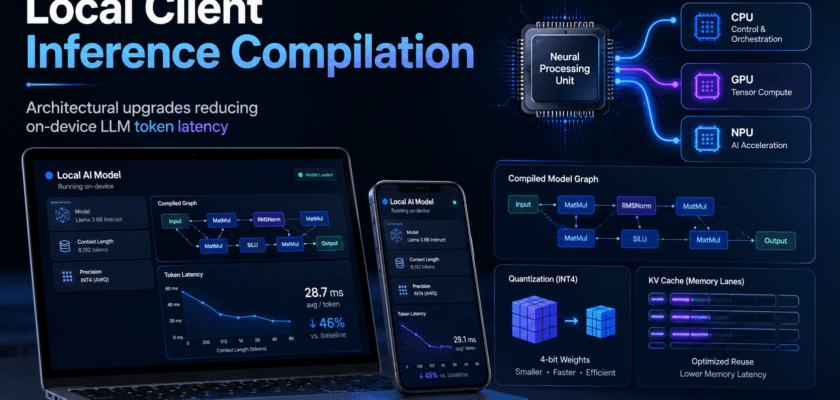
Local Client Inference Compilation: Why Token Latency Is the New AI Metric
Local client inference compilation is becoming a central upgrade path for on-device large language models. Earlier, the main question was whether a model could run locally at all. Now, the sharper question is whether it can answer quickly enough to feel useful.
Token latency matters because users notice delay immediately. A local chatbot may protect privacy, but if the first token arrives late or the response streams slowly, people return to cloud tools.
Modern local inference stacks are solving this problem through several layers: quantized weights, hardware-aware kernels, KV cache tuning, memory planning, compiler passes and better runtime scheduling.
Therefore, the race is not only about bigger models. It is about compiling smaller, smarter and more device-friendly inference paths.
| KEY TAKEAWAYOn-device AI speed is not fixed by the model alone. The same model can feel slow or fast depending on quantization, runtime backend, cache management, compilation target and memory movement. |
Local Client Inference Compilation and the On-Device LLM Stack
On-device inference has two main latency zones. The first is prefill, where the model reads the prompt. The second is decode, where the model generates tokens one by one.
A 2025 on-device latency study highlighted that mobile and edge inference needs visibility into phase-level and kernel-level bottlenecks. That is important because optimizing the wrong phase can waste engineering time.
Compilation helps by preparing the model graph and kernels for the target hardware. Instead of sending a generic workload to the chip, the runtime can use device-specific execution paths.
The Four Architectural Upgrades Cutting Token Latency
✓ Quantization reduces memory footprint and can make larger models practical on consumer hardware.
✓ Hardware-aware backends route work to CPU, GPU, NPU, Metal, Vulkan, CUDA or other accelerators where supported.
✓ KV cache optimization reduces repeated computation during long chats and repeated prompts.
✓ Runtime scheduling improves thread use, batching, memory movement and decode efficiency.
Why Quantization Is Still the First Big Lever
Quantization lowers the precision used to store and process model weights. This can reduce memory use, which is often the biggest bottleneck on laptops and mobile devices.
The llama.cpp quantization workflow describes a two-phase process: convert the original model to GGUF format and then quantize the converted file. That flow has made local experimentation easier for many developers.
However, quantization is a trade-off. Smaller formats can improve feasibility and speed, but aggressive compression can affect quality. Teams should test latency and answer quality together.
| ENGINEERING BOXA low-latency model that gives weak answers is not an optimization win. Measure speed, memory, accuracy, power draw and user experience before choosing a quantization level. |
Compiler Targets: Why One Runtime Cannot Fit Every Device
Local inference is now split across many hardware paths. Apple silicon has unified memory and Metal-friendly frameworks. Windows PCs may use CPU, GPU, NPU or ONNX-based pipelines. Android phones may depend on mobile NPUs and vendor drivers.
Apple MLX is designed for efficient and flexible machine learning on Apple silicon, while ONNX Runtime GenAI provides a way to run generative AI models on device with pre-processing, inference, logits processing, search, sampling and KV cache management.
This is why local client inference compilation needs a target-aware plan. The best path on a MacBook may not be the best path on a Windows laptop or Android device.
KV Cache: The Hidden Memory Problem in Local LLMs
The KV cache stores attention information from earlier tokens. It helps the model avoid recomputing the full context during every decode step.
However, the cache can become large during long conversations. If the device has limited memory bandwidth, cache movement can slow the model even when the chip has enough compute power.
That is why local inference teams tune context length, cache format, prompt reuse and memory placement. In some cases, a shorter but well-managed context can feel faster than an oversized context window.
Prefill vs Decode: Two Different Optimization Problems
Prefill latency affects how quickly the first token appears. Decode latency affects how smoothly the answer streams after that.
A coding assistant may need fast prefill for long files. A chat assistant may need stable decode speed for many short messages. A note-taking assistant may need both.
Because use cases differ, teams should avoid using one benchmark as the full answer. Time-to-first-token, tokens per second, memory use and power draw all matter.
Where Local Client Compilation Helps Most
✓ Private assistants that process emails, notes or PDFs locally.
✓ Offline summarizers for travel, field work or low-network locations.
✓ Developer tools that need fast code suggestions without sending files to the cloud.
✓ Enterprise desktops where privacy and data control matter.
✓ Customer-support devices that must run during network failures.
✓ Education apps where small models answer quickly on student laptops.
The Mobile NPU Direction
Mobile NPUs are becoming more important because phones and tablets need energy-efficient inference. A 2026 paper on mobile NPU acceleration for diffusion LLM inference showed that NPU-aware runtime design can reduce generation latency over a CPU baseline in that research setting.
The broader lesson is simple. Low latency depends on matching the algorithm to the hardware execution pattern.
As NPUs become more common, developers will need more predictable compiler paths and better profiling tools.
What Product Teams Should Measure
✓ Time to first token for common prompts.
✓ Sustained tokens per second during decode.
✓ Memory use at short, medium and long context lengths.
✓ Battery drain during repeated use.
✓ Thermal throttling after several minutes.
✓ Quality loss after quantization.
✓ Fallback behavior when GPU or NPU is unavailable.
✓ Cold-start time after app launch.
Common Mistakes in Local LLM Optimization
⚠ Choosing the smallest model without testing answer quality.
⚠ Using a large context window when the task only needs a short one.
⚠ Ignoring time-to-first-token and measuring only tokens per second.
⚠ Assuming one quantization format works best on every device.
⚠ Running CPU, GPU and NPU paths without checking memory transfer cost.
⚠ Forgetting thermal and battery limits on laptops and phones.
⚠ Treating benchmarks as final without testing real user prompts.
A Practical Local Inference Upgrade Framework
Teams should start with the user journey. If the assistant answers short prompts, optimize decode speed and startup time. If it reads long documents, optimize prefill, cache behavior and memory pressure.
Next, pick a model size that matches the device class. Then test multiple quantization levels and runtime backends. Finally, compare results on real hardware, not only on a developer workstation.
The winning architecture is usually a balanced one. It combines a suitable model, a stable runtime and careful memory planning.
Implementation Checklist
✓ Define target devices and minimum RAM.
✓ Pick model sizes for low, medium and high hardware tiers.
✓ Test quantized variants against answer quality.
✓ Benchmark prefill and decode separately.
✓ Tune context length and prompt reuse.
✓ Check CPU/GPU/NPU fallback behavior.
✓ Measure heat and battery during repeated sessions.
✓ Ship safe defaults and advanced settings separately.
What This Means for AI App Builders
AI app builders should stop treating local inference as a checkbox. Running locally is not enough. The app must also feel responsive.
A good product may use local inference for private and frequent tasks, while sending heavier optional workloads to the cloud with clear user consent. That hybrid pattern can balance speed, cost and privacy.
However, as local runtimes improve, more tasks will move onto the device. This will reward teams that understand compilation, quantization and hardware-aware inference now.
Organic Search Summary for Readers
Local client inference compilation reduces on-device LLM token latency by aligning the model, runtime and hardware target.
The key upgrades are quantization, backend selection, KV cache tuning, prefill/decode profiling and memory-aware scheduling.
For product teams, the best benchmark is real user experience. Measure first-token delay, streaming speed, quality, heat and battery together.
Conclusion
Local client inference compilation is becoming a major reason on-device AI feels faster in 2026. The improvement does not come from one magic trick. It comes from many small architecture choices working together.
Quantization lowers the memory burden. Compiler targets improve hardware use. KV cache tuning reduces repeated work. Profiling shows where latency actually lives.
The next generation of local AI apps will not only advertise privacy. They will also deliver fast, stable and efficient responses on real devices.
Frequently Asked Questions
Q. What is local client inference compilation?
It is the process of preparing and optimizing an LLM runtime for a local device so responses generate faster and use less memory.
Q. Why does token latency matter?
Token latency affects how quickly the first answer appears and how smoothly the response streams.
Q. Does quantization always improve speed?
Not always. It often reduces memory use, but the best speed depends on model format, runtime backend and hardware support.
Q. What is KV cache optimization?
It is the management of stored attention data so the model avoids unnecessary recomputation during generation.
Q. Can local LLMs replace cloud LLMs?
For some private and repeated tasks, yes. For very large models or heavy workloads, hybrid cloud and local designs may still be practical.


